Flotion VB — volleyball stats tracker

Track the whole match from one thumb.

Every attack, pass grade, block and fault goes in on the court where it happened: a tap for who touched the ball, a tap for what the touch was. Rotations, liberos and a 6-2 are worked out for you, and every stat is derived from the event log — so a mis-tap is a correction, not a lost match.

Free, and nothing to install — it runs in the browser on the phone you already take to the gym. Your matches live in your account, so the tablet on the bench and the laptop at home see the same thing.

What it tracks

Built around the rally, not a spreadsheet

Everything is one tap on the thing that happened. The court is the input, and the stats fall out of the log afterwards.

attacks

Tap the court

The zone grid is the attack. Tap the cell the ball was hit from and the attempt is logged against whoever is playing that position in the current rotation — no name picking, no menus.

the touch

Say what it was, after you've seen it

Tag the attempt you just logged: a free ball, a tip, an attack that met a block, or a fault on either side. The sequence tells you who touched the ball; you tell it what the touch was.

Free Tip Block Fault
serve receive

Pass grades and first-ball outcomes

Grade the pass, and where it came from, in the same row you attack with. Side-out and break-point conversion off the first ball are tagged as the point ends, not reconstructed later.

who's on court

Rotations, libero and a 6-2

One badge per team opens the whole lineup: six slots for the rotation, the libero and who they cover, and the 6-2 pair. The swaps resolve themselves — even with no roster set up, where a jersey number is enough to be a player.

nothing is stuck

Every point is editable

The log reads as points, not rows of events, and any touch inside one can be corrected on the touch itself. Substitutions can be added or removed at any score, and the stats and rotations rebuild themselves around the change.

after the match

Stats that name people

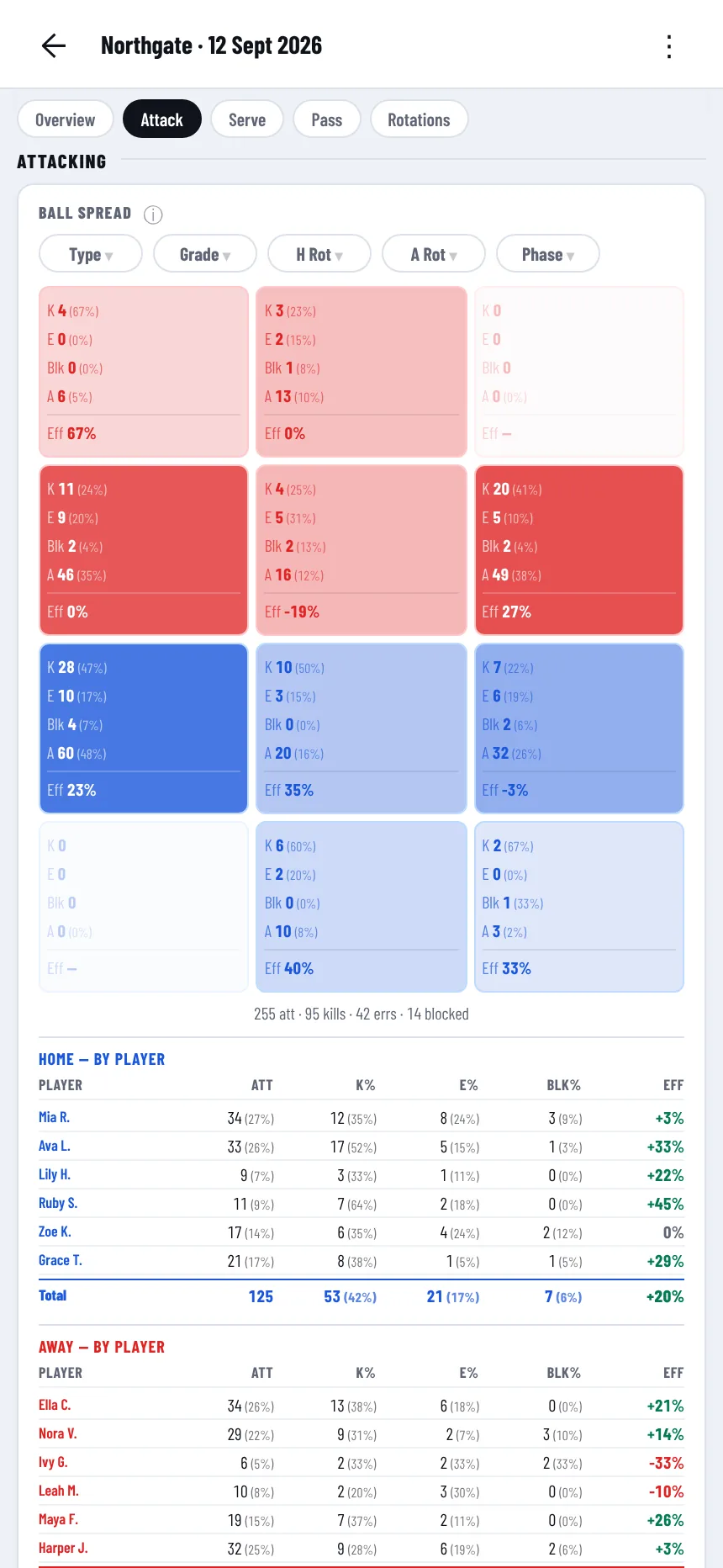
Ball spread across the court, kills and errors by player and by role, blocks and faults by team, and a breakdown per rotation. Collate several matches into one view for a season, and export any match as JSON.

A rally, start to finish

Three taps, in the order it happened

1

Grade the pass

The serve lands and you rate the pass 0–3, on the row that is already under your thumb. Optional — skip it and the strip turns straight into the rally actions.

2

Tap where it was hit from

One cell on the court. That logs the attempt against the player standing there, in the right rotation, with the pass grade attached to it.

3

Score the point

Kill, error, ace or a plain rally — the point closes and the log stamps the score and both rotations onto it. Tag a tip, a block or a fault on the way past if there was one.

Read the full guide →

On the bench

What it looks like

The setup screen: two skewed team plates, home and away, with a VS mark between them
Name the two sides and start. Rosters come with a saved team.
The tracking screen: scoreboard, zone court grid and the pass-grade action strip
The court is the input. Everything is in the bottom third, under a thumb.
The stats tab: the Ball Spread court card with per-zone attack counts
Ball spread, by player and by role, live from the first point.

Start tracking

Sign in with Google and the app opens on a new match. Nothing to install, nothing to pay for.